You’re replying to a message in a crowded café. A stranger leans slightly. Not enough to be obvious. Just enough to read your screen. That’s exactly the problem a privacy screen protector is designed to solve. It narrows your display’s viewing angle so only the person directly in front of the screen can see the content clearly. From the side, the display appears dark or completely blacked out. How Does A Privacy Screen Protector Work? Privacy protectors use micro-louver technology. These are tiny vertical blinds embedded in the screen layer. When viewed straight on: ✔ Clear and readable When viewed from an angle: ✖ Dim or blacked out It’s like turning your screen into a directional spotlight that only shines forward. Who Actually Needs One? A privacy screen protector is especially useful if you: Work remotely in public spaces Handle...
You’re replying to a message in a crowded café. A stranger leans slightly. Not enough to be obvious. Just enough to read your screen. That’s exactly the problem a privacy screen protector is designed to solve.
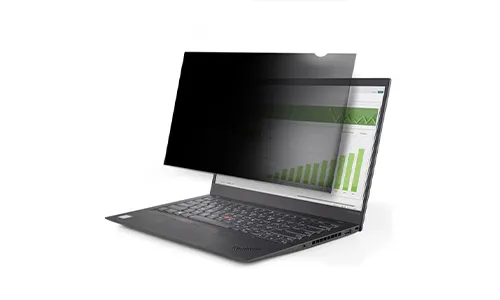
It narrows your display’s viewing angle so only the person directly in front of the screen can see the content clearly. From the side, the display appears dark or completely blacked out.
How Does A Privacy Screen Protector Work?
Privacy protectors use micro-louver technology. These are tiny vertical blinds embedded in the screen layer.
When viewed straight on: ✔ Clear and readable
When viewed from an angle: ✖ Dim or blacked out
It’s like turning your screen into a directional spotlight that only shines forward.
Who Actually Needs One?
A privacy screen protector is especially useful if you:
- Work remotely in public spaces
- Handle sensitive business information
- Travel frequently
- Use your phone for banking or confidential chats
- Work in healthcare, legal, or finance sectors
If you rarely use your device outside your home, it may be less critical.
Pros Of Using A Privacy Screen Protector
1. Visual Data Protection
Prevents shoulder surfing in public spaces.
2. Extra Screen Protection
Most options double as tempered glass protectors.
3. Reduced Glare (In Some Models)
Matte finishes can reduce reflections.
4. Peace Of Mind
You won’t feel the need to constantly tilt your screen away.
Cons You Should Know
1. Slight Brightness Reduction
Since it filters viewing angles, screens may appear dimmer.
2. Reduced Viewing Angles
Sharing your screen becomes harder.
3. Minor Color Shift
High-end displays may lose slight color accuracy.
Privacy Screen Protector For Laptops vs Phones
For Smartphones
For Laptops
Laptop versions are especially popular in corporate settings.
How To Choose The Right One
When buying, check:
- Compatibility with your device model
- 9H hardness rating (for glass)
- Anti-glare coating
- Edge-to-edge coverage
- Face ID / fingerprint compatibility
Avoid ultra-cheap options that overly darken the screen.
Is It Worth It?
Suppose you use your device mostly in private, probably not essential. If you work in airports, cafés, trains, coworking spaces, or shared offices, it’s a smart investment. A privacy screen protector doesn’t make your device hacker-proof. It simply blocks wandering eyes. And sometimes, that’s the threat you’re most likely to face.
In a world where screens carry banking data, work files, and personal conversations, visual privacy matters more than we realize. A privacy screen protector is a small accessory with a very specific purpose: keeping your digital life visible only to you.




Can a Smart Home Work Without Internet? Explained
Solana’s Worth in Future: What Could 1 SOL Be Worth?
How to Wake Up the System From Sleep Mode on Any Computer
The Mokacam 4K Sports and Action Camera: Tiny but Powerful