Fans are your system’s cooling crew. When they spin faster, they’re responding to heat, dust, or workload spikes. A noisy fan isn’t just annoying; it’s often a signal that your machine is working harder than it should. Common triggers include: High CPU or GPU usage Dust buildup is restricting airflow Poor ventilation Aggressive fan curves Aging thermal paste Understanding the cause is the first step to a quieter setup. Quick Checks Before You Start Before tweaking settings or opening your system, try these fast fixes: Restart your computer to clear runaway processes Close heavy apps or browser tabs Move the device to a cooler, well-ventilated spot Sometimes the solution is refreshingly simple. Clean Dust And Improve Airflow Dust is the silent amplifier of fan noise. Even a thin layer can trap heat and force fans to spin faster. What To...
Fans are your system’s cooling crew. When they spin faster, they’re responding to heat, dust, or workload spikes. A noisy fan isn’t just annoying; it’s often a signal that your machine is working harder than it should.
Common triggers include:
- High CPU or GPU usage
- Dust buildup is restricting airflow
- Poor ventilation
- Aggressive fan curves
- Aging thermal paste
Understanding the cause is the first step to a quieter setup.
Quick Checks Before You Start
Before tweaking settings or opening your system, try these fast fixes:
- Restart your computer to clear runaway processes
- Close heavy apps or browser tabs
- Move the device to a cooler, well-ventilated spot
Sometimes the solution is refreshingly simple.
Clean Dust And Improve Airflow
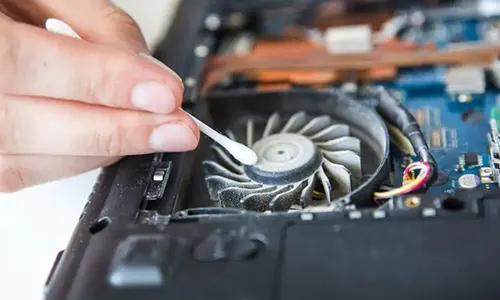
Dust is the silent amplifier of fan noise. Even a thin layer can trap heat and force fans to spin faster.
What To Do
- Power off and unplug your computer
- Use compressed air to clean vents and fans
- Wipe exterior grills gently
- Ensure nothing blocks airflow
If you’re using a desktop, cleaning every few months makes a dramatic difference.
Adjust Fan Speed Settings
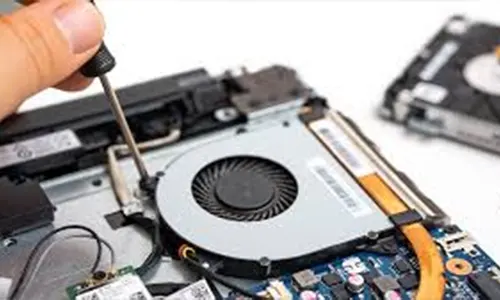
Most systems allow you to control fan behavior.
On Windows
- Use BIOS/UEFI fan controls
- Try manufacturer tools (like Lenovo Vantage or ASUS Armoury Crate)
On macOS
Third-party utilities can help monitor temperatures and manage fan curves.
Lowering aggressive fan curves often reduces noise without impacting cooling under normal workloads.
Check Background Processes
Sometimes the noise isn’t hardware, it’s software chaos.
Open Task Manager (Windows) or Activity Monitor (Mac) and look for:
- Apps using high CPU
- Browser tabs consuming memory
- Hidden updates or syncing tasks
Ending unnecessary processes can instantly quiet your system.
Replace Or Upgrade Cooling Components
If your computer is older, hardware upgrades can make a huge difference.
Consider:
- Quieter aftermarket fans
- Laptop cooling pads
- Reapplying thermal paste
- Upgrading to SSDs (reduces heat vs HDDs)
Modern cooling components are designed to move air efficiently with less turbulence.
Optimize Your Environment

Your room temperature affects your computer more than you might think.
- Keep the system off carpets or soft surfaces
- Maintain a cool ambient temperature
- Use a stand for laptops to improve airflow
A cooler environment means fans don’t have to work overtime.
When Fan Noise Is A Warning Sign
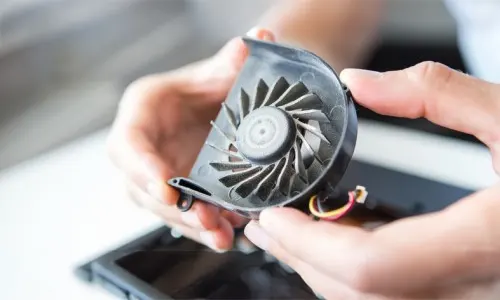
If you hear grinding, rattling, or sudden spikes in noise, it could indicate:
- Failing fan bearings
- Loose internal components
- Thermal throttling
In these cases, servicing or replacement is the safest route.
Learning how to reduce computer fan noise is really about balancing performance and cooling. With regular cleaning, smarter settings, and a bit of optimization, most computers can run quietly without sacrificing power.
A silent system isn’t just more pleasant, it often runs more efficiently too, turning that constant whirr into a gentle background whisper.




Why Are Vertu Phones So Expensive?
Can a Smart Home Work Without Internet? Explained
Solana’s Worth in Future: What Could 1 SOL Be Worth?
How to Wake Up the System From Sleep Mode on Any Computer