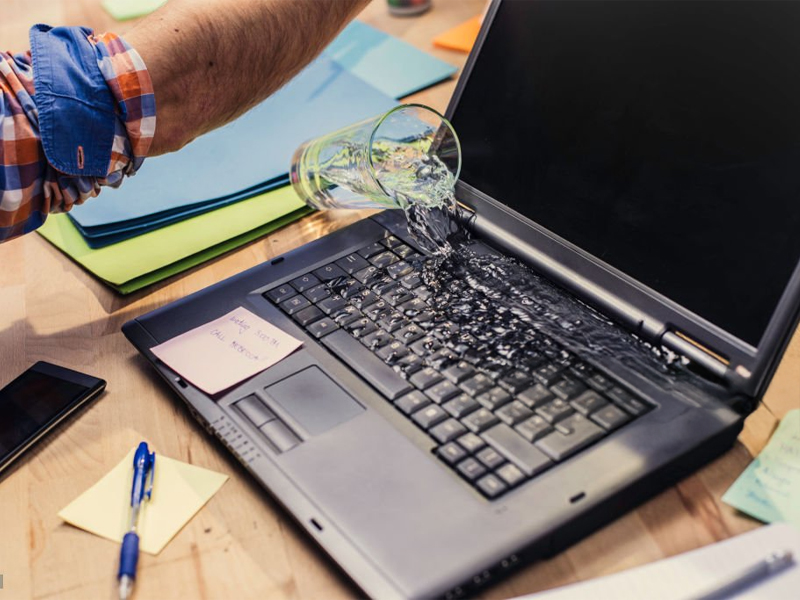
Spilled water on your laptop? You’ve got a very short window — about 30 seconds to a few minutes to reduce the risk of permanent damage. That doesn’t mean you should panic. It means you need to do the right things immediately and avoid the wrong ones. Here’s a practical, no-nonsense guide on how to save your laptop from water damage and what to do next. Step-by-Step: What to Do Immediately 1. Turn It Off — Instantly If your laptop is still on, shut it down immediately. Do not use the shutdown option from the OS. Hold down the power button to force shut it off. If you’re charging it, unplug the charger first. 2. Unplug Everything Remove all peripherals: USB drives, headphones, and external hard drives. If your battery is removable, take it out. (If not, skip this step...
Spilled water on your laptop? You’ve got a very short window — about 30 seconds to a few minutes to reduce the risk of permanent damage. That doesn’t mean you should panic. It means you need to do the right things immediately and avoid the wrong ones.
Here’s a practical, no-nonsense guide on how to save your laptop from water damage and what to do next.
Step-by-Step: What to Do Immediately
1. Turn It Off — Instantly

If your laptop is still on, shut it down immediately. Do not use the shutdown option from the OS. Hold down the power button to force shut it off.
If you’re charging it, unplug the charger first.
2. Unplug Everything

Remove all peripherals: USB drives, headphones, and external hard drives. If your battery is removable, take it out. (If not, skip this step — don’t try to pry it open.)
3. Blot, Don’t Wipe
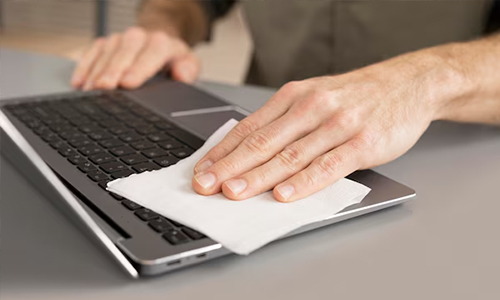
Grab a dry microfiber or lint-free cloth. Gently blot the wet areas. Don’t wipe aggressively — you’ll push water into the crevices.
4. Flip It
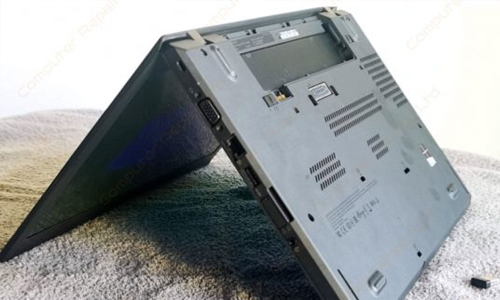
Flip the laptop upside down like an open tent (in an inverted “V” shape) with the keyboard facing down. Gravity is your friend — let the liquid drain out, not deeper in.
Leave it in this position for at least 24 to 48 hours.
5. Do Not Use Rice
Rice does not magically absorb internal moisture. You’re better off using silica gel packs if you have them — otherwise, air drying in a dry environment is your best bet.
Common Mistakes to Avoid
- Do not try to turn it back on “to check” if it still works. This is the #1 way people fry their motherboards.
- Do not use a hair dryer or heat gun. Heat can melt sensitive internal parts.
- Do not shake it vigorously. That only spreads the water around.
When Should You Take It to a Repair Shop?

Take your laptop to a professional if:
- The spill was not just water (e.g., coffee, soda, juice — these are acidic and corrosive).
- It doesn’t turn back on after 48 hours.
- You see signs of damage: flickering screen, keyboard issues, overheating.
- It turns back on because internal corrosion can develop over time. A repair shop can open it, clean the logic board, and apply anti-corrosive treatments.
So, you should take it to the repair shop immediately before using it!
Can a Laptop Survive a Water Spill?
Yes, only if you act quickly and properly. Water alone isn’t always fatal, but electricity and moisture are a deadly combo. Your quick shutdown and proper drying steps can make the difference.
Prevent Future Damage: Tips That Actually Help
- Use a keyboard cover — they cost less than $10 and stop most spills.
- Keep liquids off the desk or in spill-proof containers.
- Store your laptop in a moisture-safe case when not in use.
- Use a water-resistant laptop skin or shell.
Also Read, will earbuds work after being washed?
Laptop Accident FAQs
How long should I let my laptop dry before turning it on?
A: At least 24–48 hours. The longer you wait, the safer it is — especially for deeper internal components.
My laptop is working fine after drying. Should I still be worried?
Maybe. Corrosion or mineral buildup from even clean water can cause issues weeks later. If the data is valuable, have it checked.
Is it worth repairing a water-damaged laptop?
Depends on the model and damage. For expensive laptops, a professional cleaning might save it. Always back up your data if you recover it.
If you’ve just spilled water on your laptop, time is everything. The quicker you act, the better your chances of reviving it with minimal damage. Don’t rely on myths — stick to practical steps and don’t hesitate to get professional help if needed.




Solana’s Worth in Future: What Could 1 SOL Be Worth?
How to Wake Up the System From Sleep Mode on Any Computer
The Mokacam 4K Sports and Action Camera: Tiny but Powerful
How to Choose the Best Document Scanner for Your Needs