Using a DNS to block ads works by routing your internet traffic through servers that filter and block ad-related domains before they load on your device. What Is DNS and How Does It Block Ads? DNS (Domain Name System) acts like the internet’s phonebook. When you use a special DNS that blocks ads, it prevents your device from connecting to known ad servers. So instead of ads loading, they simply don’t appear at all. Best DNS Servers to Block Ads Here are some popular DNS options: AdGuard DNS Primary: 94.140.14.14 Secondary: 94.140.15.15 NextDNS (customizable ad blocking) Control D (advanced filtering options) These DNS providers automatically block: Ads Trackers Malicious domains How to Use DNS to Block Ads on Any Device On Android Go to Settings > Network & Internet Tap Private DNS Select Private DNS provider hostname Enter: dns.adguard.com Save...
Using a DNS to block ads works by routing your internet traffic through servers that filter and block ad-related domains before they load on your device.
What Is DNS and How Does It Block Ads?
DNS (Domain Name System) acts like the internet’s phonebook. When you use a special DNS that blocks ads, it prevents your device from connecting to known ad servers.
So instead of ads loading, they simply don’t appear at all.
Best DNS Servers to Block Ads
Here are some popular DNS options:
- AdGuard DNS
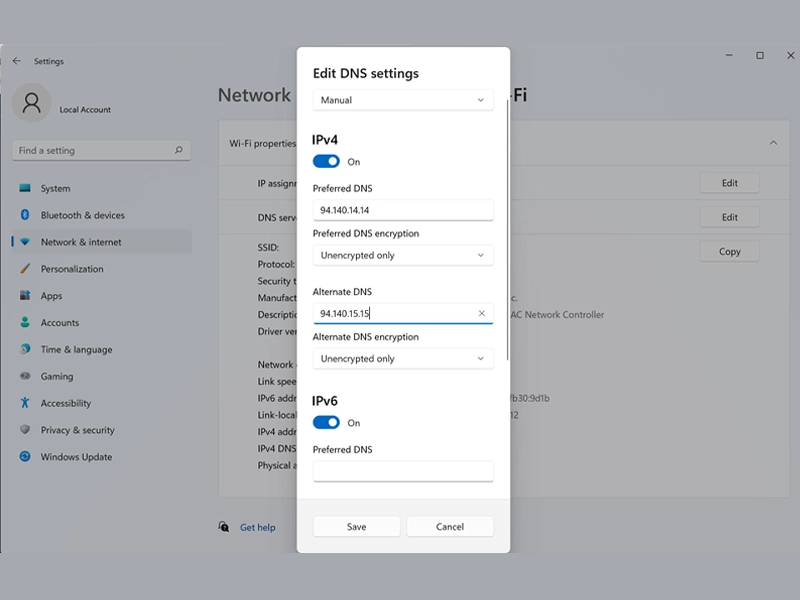
- Primary: 94.140.14.14
- Secondary: 94.140.15.15
- NextDNS (customizable ad blocking)
- Control D (advanced filtering options)
These DNS providers automatically block:
- Ads
- Trackers
- Malicious domains
How to Use DNS to Block Ads on Any Device
On Android
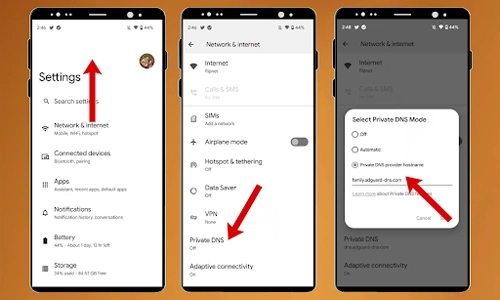
Go to Settings > Network & Internet
Tap Private DNS
Select Private DNS provider hostname
Enter: dns.adguard.com
Save
On iPhone (iOS)
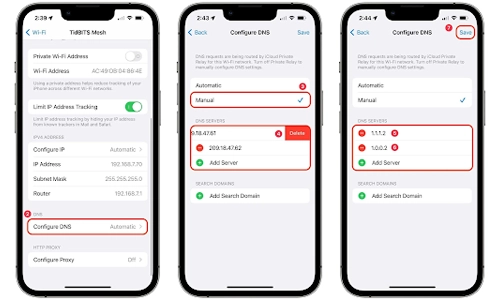
Go to Settings > Wi-Fi
Tap your network
Select Configure DNS
Choose Manual
Enter DNS addresses
Save
On Windows
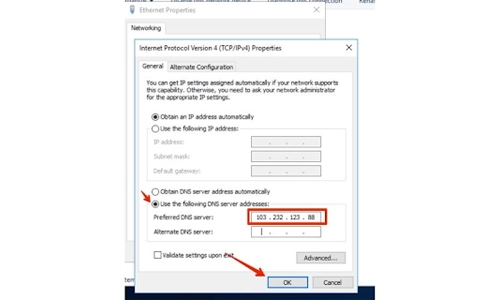
Open Control Panel
Go to Network Settings
Click Change Adapter Options
Select your connection
Enter DNS manually
On Router (Best Method)
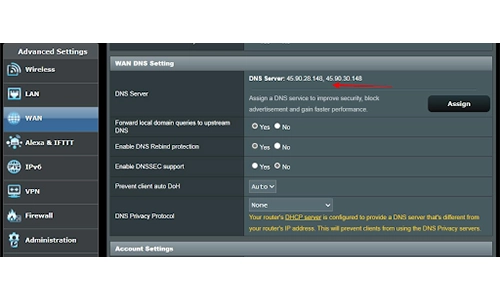
- Log in to your router admin panel
- Find DNS settings
- Enter ad-blocking DNS
- Save and restart
This blocks ads on all devices connected to your Wi-Fi.
Benefits of Using DNS to Block Ads
- No need to install apps
- Works across all devices
- Improves browsing speed
- Enhances privacy
- Reduces data usage
Limitations You Should Know
- Doesn’t block ads inside some apps (like YouTube)
- Some websites may break
- Less control compared to ad-blocker apps
DNS vs Ad Blocker Apps
| Feature |
DNS Blocking |
Ad Blocker Apps |
| Easy setup |
✅ |
❌ |
| Works system-wide |
✅ |
❌ |
| Advanced filtering |
❌ |
✅ |
| App-level blocking |
❌ |
✅ |
Tips for Best Results
- Use DNS on your router for full coverage
- Combine with a browser ad blocker for better results
- Choose a trusted DNS provider
FAQs
1. What is the best DNS to block ads?
AdGuard DNS is one of the most popular and easiest options for blocking ads.
2. Is using DNS to block ads safe?
Yes, as long as you use a trusted provider.
3. Can DNS block YouTube ads?
No, most DNS services cannot block ads within YouTube apps or videos.
4. Does DNS blocking slow down internet speed?
No, it often improves speed by preventing ad loading.
5. Do I need technical skills to set it up?
No, it’s simple and takes just a few minutes.
Using a DNS to block ads is one of the easiest ways to enjoy a cleaner, faster internet experience. While it’s not perfect, it’s a powerful first step toward an ad-free digital life.



What Will a $10,000 Investment in Bitcoin Be Worth in 10 Years?
How to Use Voice Typing on Your Phone: A Complete Guide
How to Format a USB Drive Easily on Any Device Today
How OTA Updates Keep Connected Devices Secure and Smart