Google Vids is Google's latest leap into AI-powered creativity. Designed to fit right into your Google Workspace, this tool helps you create videos just as easily as you'd create a doc or a presentation. If you're wondering how to access Google Vids, whether it's free, or when it will be available to everyone, you're in the right place. This tutorial will walk you through how to start using Google Vids immediately—no editing background required. What Is Google Vids? Google Vids is an AI video creation tool from Google that lets you draft, edit, and produce professional-looking videos using text prompts, preloaded templates, and Google Drive integrations. It works like Slides meets Docs—but outputs a video. How to Access Google Vids As of now, Google Vids is part of Google Workspace Labs, meaning it's available to select Workspace users only. If...
Google Vids is Google's latest leap into AI-powered creativity. Designed to fit right into your Google Workspace, this tool helps you create videos just as easily as you'd create a doc or a presentation. If you're wondering how to access Google Vids, whether it's free, or when it will be available to everyone, you're in the right place.
This tutorial will walk you through how to start using Google Vids immediately—no editing background required.
What Is Google Vids?
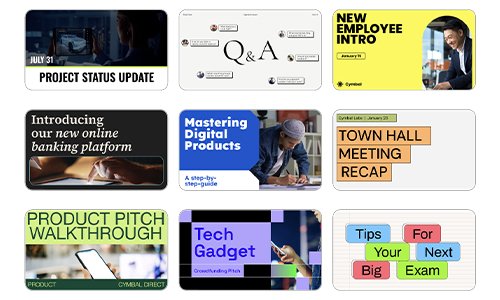
Google Vids is an AI video creation tool from Google that lets you draft, edit, and produce professional-looking videos using text prompts, preloaded templates, and Google Drive integrations. It works like Slides meets Docs—but outputs a video.
How to Access Google Vids
As of now, Google Vids is part of Google Workspace Labs, meaning it's available to select Workspace users only. If you’re enrolled in the Labs program:
- Open your Google Workspace dashboard.
- Click the “+ New” button and select Google Vids. If you don’t see it, head to workspace.google.com/labs and sign up for early access.
Tip: Google Vids works best on Chrome and integrates fully with Google Drive, Slides, Docs, and Meet.
Step-by-Step: Create a Video Using Google Vids
[embed]https://storage.googleapis.com/gweb-uniblog-publish-prod/original_videos/Gemini_Tab_-_Compilation_v2.mp4[/embed]
Let’s dive in.
Step 1: Start a New Project
Go to your Workspace homepage.
Click Google Vids > Blank Project or choose from a template.
Step 2: Write Your Script or Prompt
Enter a basic outline or idea into the AI script generator.
The tool will auto-generate a video script, voiceover, and scene structure.
Step 3: Customize Scenes
Add slides, text, and images from your Google Drive.
Drag and drop media into different scenes.
Edit transitions and animations, just like you would in Slides.
Step 4: Add a Voiceover
Choose an AI voice or upload your own.
You can also record voiceovers right in the app.
Step 5: Preview and Export
Hit Preview to watch your video.
Click Export to download or share directly via Gmail or Google Meet.
Google Vids Pricing: Is It Free?
As of now, Google Vids is free for Workspace Labs users. Google hasn't revealed official pricing, but it’s expected that it will be bundled with Google Workspace premium plans once fully launched. Advanced features like team collaboration, analytics, and HD exports may be part of paid tiers.
Google Vids AI Features That Stand Out
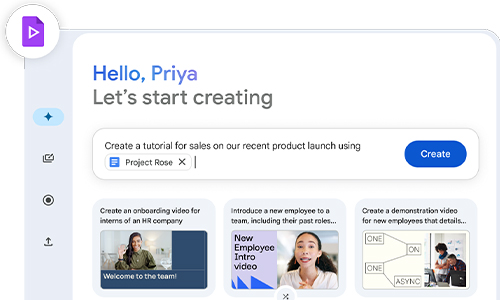
- Script assistant: Generates storyboards based on your idea.
- Smart voiceovers: Natural-sounding AI narrators.
- Auto-media suggestions: Pulls images and clips from your Drive or the web.
- Collaboration: Multiple team members can work on the same video in real time—just like in Google Docs.
Frequently Asked Questions
Is Google Vids free to use?
Currently, yes—for those enrolled in Google Workspace Labs. A pricing model is expected when it fully rolls out.
How do I access Google Vids if I'm not in Labs?
You’ll need to join the Workspace Labs waitlist or wait until public rollout later in 2024.
Can I use Google Vids on mobile?
Right now, it’s optimized for desktop use, with mobile access likely coming post-launch.
Can I add my own audio or music in Google Vids?
Yes, you can upload custom audio or use Google’s built-in voiceover tools.
Is Google Vids available in all countries?
Not yet. It’s gradually being rolled out in English-speaking regions first.
Google Vids is shaping up to be the go-to video creation tool for anyone in the Google Workspace ecosystem. It’s smart, intuitive, and fully backed by Google's AI capabilities. Whether you're a teacher, marketer, content creator, or startup founder—you’ll want to keep this tool on your radar.




Can a Smart Home Work Without Internet? Explained
Solana’s Worth in Future: What Could 1 SOL Be Worth?
How to Wake Up the System From Sleep Mode on Any Computer
The Mokacam 4K Sports and Action Camera: Tiny but Powerful