“Alexa, turn on the lights.” If that’s about as far as your smart assistant experience goes, you’re missing out on a goldmine of powerful, lesser-known features that Amazon Alexa has to offer. Whether you’re using an Echo Dot, Echo Show, or the Fire Max 11 Tablet, Alexa’s feature set has grown far beyond basic weather reports and timers. In this guide, we’ll walk you through the best Alexa features that can make your home smarter, your life easier, and even improve accessibility for everyone. 1. Show and Tell: Smart Identification for Everyone One of the most helpful (and often overlooked) Alexa features is Show and Tell. Designed for users with vision impairments, this feature uses the Echo Show’s built-in camera to identify everyday items — like spices, canned goods, or medication. Try it out: Just say, “Alexa, what am I...
“Alexa, turn on the lights.” If that’s about as far as your smart assistant experience goes, you’re missing out on a goldmine of powerful, lesser-known features that Amazon Alexa has to offer.
Whether you’re using an Echo Dot, Echo Show, or the Fire Max 11 Tablet, Alexa’s feature set has grown far beyond basic weather reports and timers. In this guide, we’ll walk you through the best Alexa features that can make your home smarter, your life easier, and even improve accessibility for everyone.
1. Show and Tell: Smart Identification for Everyone
One of the most helpful (and often overlooked) Alexa features is Show and Tell. Designed for users with vision impairments, this feature uses the Echo Show’s built-in camera to identify everyday items — like spices, canned goods, or medication.
Try it out: Just say, “Alexa, what am I holding?”
Alexa will guide you to position the item properly and tell you what it is. Super useful if you ever mix up cinnamon and cumin!
2. Eye Gaze: Hands-Free, Voice-Free Control
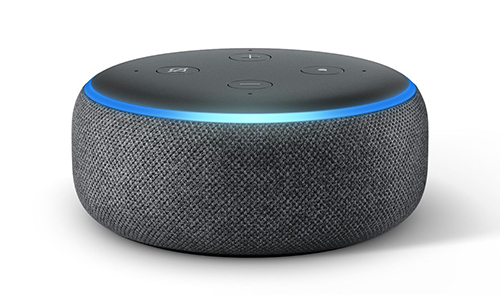
Still in early development, Eye Gaze allows users to control Alexa using only their eye movements. This is a game-changer for individuals with vocal or mobility impairments and is currently supported on the Fire Max 11 Tablet in select regions.
It’s a powerful step toward more inclusive technology — and a peek into the future of hands-free interaction.
3. Real-Time Translation and Call Captions
Did you know Alexa can help with multilingual conversations and assist the hearing impaired? When using Echo Show for video calls, Alexa can display real-time captions — even in different languages.
Bonus: You don’t need a translator anymore to talk with relatives overseas or coworkers who speak a different language. Enable call captions in your Alexa app or device settings.
4. Adaptive Listening: Speak at Your Own Pace
Not everyone speaks at the same speed — and Alexa’s default response time can sometimes be too quick to catch slower or interrupted commands.
Adaptive Listening extends Alexa’s listening window to give you more time to speak. It’s great for users with speech impairments, but even everyday users report liking it for more natural conversations.
How to enable it: Go to Alexa app > Settings > Device Settings > [Your Device] > Adaptive Listening.
5. Find Your Phone (Even on Silent!)
We’ve all been there — your phone’s on silent, and you have zero clue where it is. Thanks to Alexa, finding it is as easy as asking.
Just say, “Alexa, find my phone,” and she’ll ring it for you (even if it’s on vibrate). This built-in feature works with connected smartphones and can be a daily lifesaver for forgetful users.
6. Whisper Mode: For Those Late-Night Questions
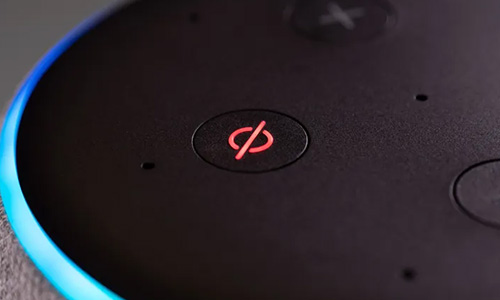
Asking Alexa something in the middle of the night can be… risky. No one wants her booming voice waking up the baby. Enter: Whisper Mode.
Once enabled, Alexa matches your whisper with a whisper of her own — so your late-night curiosity doesn’t disturb the peace.
Enable it via voice: “Alexa, turn on Whisper Mode.”
Or go to Alexa app > Settings > Voice Responses > Toggle on Whisper Mode.
7. Emergency Assist: Your Personal SOS System
While Alexa still can’t dial 911 directly, Emergency Assist lets you connect with trained Urgent Response agents who can send emergency services your way.
With the Alexa Emergency Assist subscription ($5.99/month or $59/year), you get:
- Up to 25 emergency contacts
- Sound detection (e.g., glass breaking, smoke alarms)
- Quick access to help — hands-free
Free users can still assign a single emergency contact, but the subscription brings peace of mind for families or seniors.
FAQs About the Best Alexa Features
1. How do I enable Whisper Mode on Alexa?
Go to the Alexa app > Settings > Voice Responses, then toggle on Whisper Mode. You can also just say, “Alexa, turn on Whisper Mode.”
2. Can Alexa find my phone if it’s on silent?
Yes, Alexa can ring your connected smartphone even if it’s on vibrate or silent, using the “Find My Phone” feature.
3. What is Show and Tell in Alexa?
Show and Tell uses the Echo Show’s camera to identify physical items (like food containers or household objects) and announce what they are — ideal for users with low vision.
4. Is Emergency Assist free on Alexa?
No. While Alexa allows one emergency contact for free, Emergency Assist — which includes 24/7 trained agents and expanded contact options — requires a paid subscription.
5. Which Alexa devices support Eye Gaze?
As of now, Eye Gaze is available only on the Fire Max 11 Tablet in select countries. It’s still a developing feature.
Are You Using Alexa to Its Full Potential?
Most people use Alexa for alarms, timers, and lights — but its real power lies in these overlooked features that can boost accessibility, communication, and everyday convenience.
Whether you want to find your lost phone, whisper in peace, or help a loved one with visual impairments, Alexa has the tools. So go ahead — explore your device settings and start making the most of these best Alexa features.





Can a Smart Home Work Without Internet? Explained
Solana’s Worth in Future: What Could 1 SOL Be Worth?
How to Wake Up the System From Sleep Mode on Any Computer
The Mokacam 4K Sports and Action Camera: Tiny but Powerful