Meta’s social platform Threads is making waves again—this time by tackling one of the most complained-about aspects of online conversation: spoilers. Yes, that dreaded moment when you’re peacefully scrolling and BAM! Someone casually reveals a major plot twist from your favorite show. Now, with the new Threads spoiler tag feature, users have a way to protect themselves—and others. Let’s break down what this new feature is, how it works, and why it’s a step forward in the evolving etiquette of online sharing. What Is the Threads Spoiler Tag? Meta CEO Mark Zuckerberg announced a new test feature on Threads that allows users to mark content as spoilers. This means you can now blur text or images that might give away key details from movies, shows, sports, books, or games. When you write a post on Threads, you can tap on...
Meta’s social platform Threads is making waves again—this time by tackling one of the most complained-about aspects of online conversation: spoilers. Yes, that dreaded moment when you’re peacefully scrolling and BAM! Someone casually reveals a major plot twist from your favorite show. Now, with the new Threads spoiler tag feature, users have a way to protect themselves—and others.
Let’s break down what this new feature is, how it works, and why it’s a step forward in the evolving etiquette of online sharing.
What Is the Threads Spoiler Tag?
Meta CEO Mark Zuckerberg announced a new test feature on Threads that allows users to mark content as spoilers. This means you can now blur text or images that might give away key details from movies, shows, sports, books, or games.
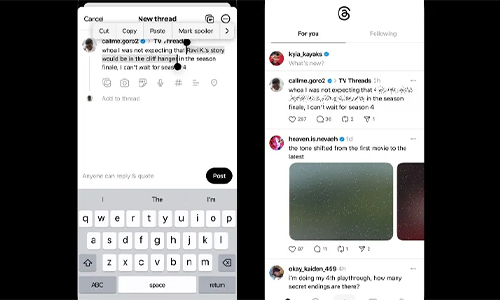
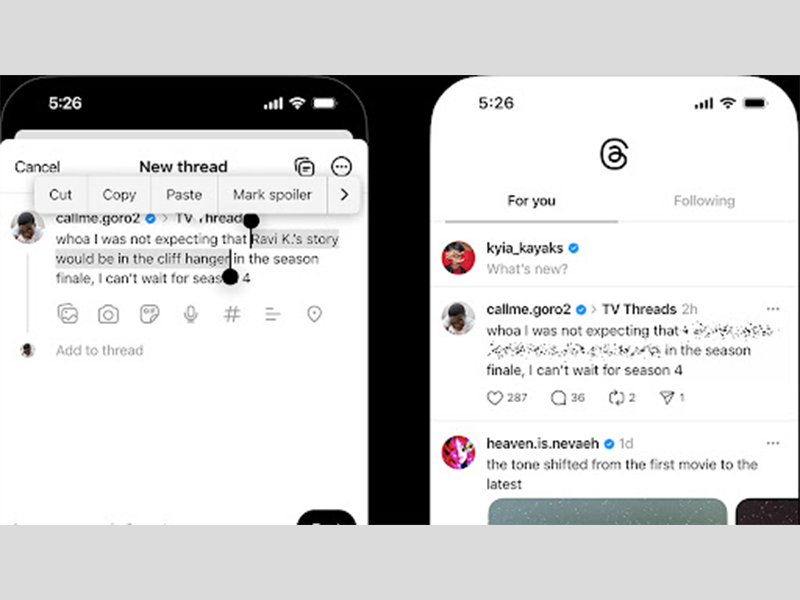
When you write a post on Threads, you can tap on an image or highlight specific text, and then select “mark spoiler.” This action hides the content behind a visual barrier—gray blocks on desktop and floating dots on mobile. Users who wish to view the content can tap to reveal it.
It's simple, effective, and most importantly, puts control in the hands of both the poster and the reader.
Why Is This a Big Deal?
Until now, Threads didn’t offer any native tool for hiding spoilers. Platforms like Reddit have long included spoiler tags, and fans have begged for similar features across other social media channels.
The Threads spoiler tag could help:
- Prevent major plot reveals from ruining a viewer’s experience
- Encourage more thoughtful content sharing
- Make Threads a more enjoyable space for fandoms
Spoilers have become a persistent issue in the age of real-time streaming and binge-watching. Shows like House of the Dragon, Stranger Things, or The Mandalorian trigger massive online discussions the moment they air. Not everyone watches content the second it drops—and that’s okay.
This feature helps create a buffer for those who are even a few hours behind.
How Does It Work?
Here’s what we know so far:
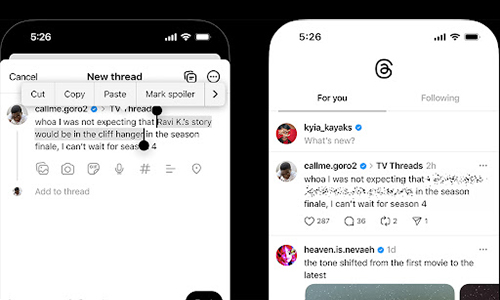
- Blurring Options: You can manually mark an image or snippet of text as a spoiler. Threads will blur it out until users click to reveal.
- Mobile vs. Desktop: The mobile version features playful floating dots over spoiler content, while the desktop uses a more minimalistic gray box.
- User-Controlled: It’s entirely up to the poster to decide what counts as a spoiler and whether to hide it.
A Meta spokesperson has confirmed that this is a global test, although it’s not yet clear how widely it has rolled out. If you don’t see the option yet, you may get access soon.
The Catch: What Counts as a Spoiler?
This feature, while great in theory, opens up a gray area. What you consider a spoiler might be common knowledge to someone else.
For example:
- Is a character death that happened two weeks ago still a spoiler?
- Should meme reactions to the latest Marvel movie be tagged?
- What about sports scores?
These are subjective questions, and since the system relies on individual discretion, misuse or overuse is likely. Still, the feature is a welcome addition and reflects a broader shift toward user-centered content control.
Comparison with Other Platforms

| Platform |
Spoiler Feature |
User Experience |
| Threads |
Yes (testing) |
Manual blur on mobile/desktop |
| Reddit |
Yes |
Auto-tag, clear guidelines |
| X (Twitter) |
No |
None built-in |
| Instagram |
No |
None built-in |
Threads now joins Reddit as one of the few platforms offering native spoiler protections, which may give it a slight edge among entertainment-heavy communities.
What This Means for Content Creators
If you’re someone who writes TV or movie reviews, shares real-time updates on sports or games, or runs a fan page, the Threads spoiler tag could be a useful tool to protect your audience.
It also signals that Threads is leaning further into becoming a creator-first, community-driven platform. By allowing content segmentation and optional reveals, Threads gives more autonomy to creators and fans alike.
FAQs About Threads’ Spoiler Tag Feature
1. Who can use the Threads spoiler tag?
As of now, it's being rolled out as a global test, so not all users will have access yet.
2. Can I tag entire posts as spoilers?
You can mark individual images or lines of text. Entire posts are not automatically blurred unless all content is marked.
3. Will Threads auto-detect spoilers?
No. The feature relies entirely on the person posting to apply the tag.
4. Is this feature available on Instagram or Facebook?
No. Currently, it's exclusive to Threads.
5. What happens if I don’t mark a spoiler?
Nothing technically, but it could lead to backlash or unfollows from users who expected spoiler warnings.
Meta’s Threads is slowly but surely building out its platform to reflect the nuanced ways we consume and share media. The Threads spoiler tag is a subtle but powerful feature—designed not just to protect plot points, but to promote thoughtful engagement.
Will it prevent all spoilers? Definitely not. But it’s a promising sign that Threads is listening to its users—and trying to create a space that feels a bit more respectful and a lot more fun.




Can a Smart Home Work Without Internet? Explained
Solana’s Worth in Future: What Could 1 SOL Be Worth?
How to Wake Up the System From Sleep Mode on Any Computer
The Mokacam 4K Sports and Action Camera: Tiny but Powerful