You bought smart home devices to make life easier—not to feel like you’re running tech support in your own living room. One app for lights, another for locks, and a third to close the blinds? That’s not smart; that’s chaos. Let’s simplify things. Whether you’re Team Alexa, all-in on Apple, or tinkering with Home Assistant, here’s how to bring harmony to your smart home—without losing your sanity. What’s Holding Back Your Smart Home? In theory, smart home devices should talk to each other like old friends. But reality check: most brands play in their own sandbox. That means separate hubs, different apps, and constant compatibility headaches. You could end up needing multiple hubs, burning through your router’s Ethernet ports, or resorting to a spaghetti mess of network switches. And don’t get us started on the app-juggling. Start With a Smart...
You bought smart home devices to make life easier—not to feel like you’re running tech support in your own living room. One app for lights, another for locks, and a third to close the blinds? That’s not smart; that’s chaos.
Let’s simplify things. Whether you’re Team Alexa, all-in on Apple, or tinkering with Home Assistant, here’s how to bring harmony to your smart home—without losing your sanity.
What’s Holding Back Your Smart Home?
In theory, smart home devices should talk to each other like old friends. But reality check: most brands play in their own sandbox. That means separate hubs, different apps, and constant compatibility headaches.
You could end up needing multiple hubs, burning through your router’s Ethernet ports, or resorting to a spaghetti mess of network switches. And don’t get us started on the app-juggling.
Start With a Smart Home Hub

A hub acts like the translator at a United Nations meeting—it helps devices from different brands communicate. Popular options include:
- Amazon Echo (Alexa)
- Google Nest Hub
- Apple HomePod (HomeKit)
- Aeotec Smart Home Hub
Most hubs let you control various devices through one app or via voice commands. But watch out—some brands or communication protocols (like Zigbee) may not be supported by all hubs. Always check compatibility before buying.
Pick Your Ecosystem and Stick to It
Choose your smart home platform based on what devices you already own—or what you plan to add. Here’s a quick cheat sheet:
- Alexa and Google Home – Broad compatibility with most smart gadgets.
- Apple Home – Best for iPhone users but more limited in supported devices.
- Home Assistant – Great if you’re tech-savvy and want full control.
Once you’ve picked your platform, stick with it. Future-proof your setup by looking for labels like “Works with Alexa” or “Supports Apple Home.”
Want Ultimate Compatibility? Consider Home Assistant
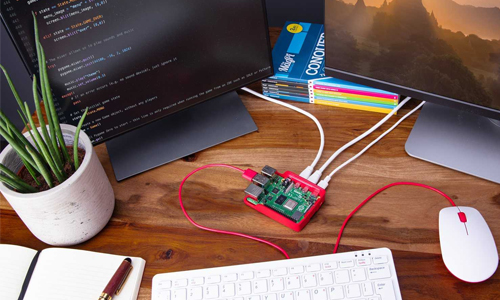
If you’re the type who reads forums and doesn’t mind some setup work, Home Assistant might be your dream come true. It supports a jaw-dropping range of devices across ecosystems using custom integrations.
You’ll need a device to run it (like a Raspberry Pi or Home Assistant Green), but once it’s up and running, it’s a powerhouse. Just be ready for a learning curve.
Why Wi-Fi Isn’t Always Your Friend
Most smart devices run on Wi-Fi, but that’s not always ideal. Too many Wi-Fi devices can:
- Slow down your network
- Struggle with long-distance connections
- Rely too heavily on cloud servers (so when your internet dies, so does your smart home)
Enter: Zigbee and Thread
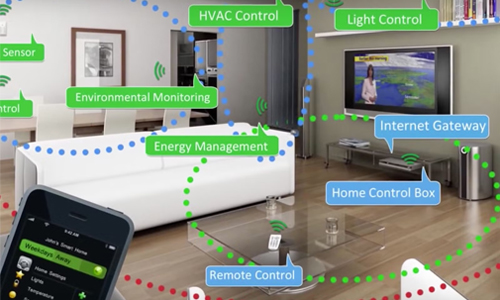
Zigbee devices form a mesh network that’s less power-hungry and more reliable. Even better, Thread is a newer alternative developed specifically for smart homes. It also uses mesh networking—but faster, and with native support for Matter devices.
The Future: Matter and Thread
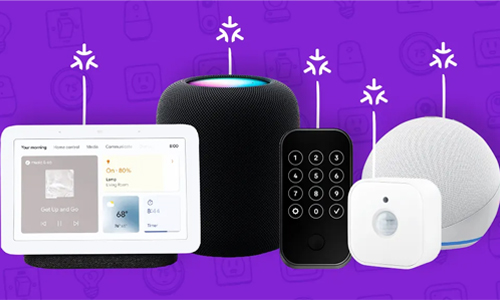
To solve the compatibility mess, tech giants created Matter—a universal standard for smart home tech. Matter-compatible devices can talk to Alexa, Google Assistant, or Siri right out of the box.
Thread, Matter’s mesh-powered sidekick, ensures those devices stay connected without hogging your Wi-Fi.
To make it all work:
- Choose Matter-certified devices
- Use a Thread border router (like a HomePod Mini or 4th Gen Echo)
It’s not perfect yet, but it’s a major leap forward.
You don’t need to be a software engineer to get your smart home devices to work together—you just need to be strategic. Choose a hub or ecosystem that fits your lifestyle, stick with compatible gear, and keep an eye on emerging standards like Matter and Thread.
Soon enough, your smart home might actually start feeling… well, smart.




Solana’s Worth in Future: What Could 1 SOL Be Worth?
How to Wake Up the System From Sleep Mode on Any Computer
The Mokacam 4K Sports and Action Camera: Tiny but Powerful
How to Choose the Best Document Scanner for Your Needs