The Huawei MediaPad X1 was one of the most advanced “phablets” of its time—and even today, it still has a few surprisingly useful roles if you use it the right way. Back in 2014, the line between phones and tablets was blurry. And right in the middle of that phase, Huawei quietly launched something that felt… different. Let’s revisit why the Huawei Mediapad X1 stood out—and what you can realistically do with it today. Remembering the Huawei MediaPad X1 MWC 2014 and the Peak Phablet Era At MWC 2014, brands were experimenting hard. Bigger screens Slimmer bodies Phone-tablet hybrids (aka phablets) The huawei mediapad x1 fit right into this trend—but it didn’t just follow it. It pushed it further. At a time when most phones were bulky, this device felt surprisingly premium and forward-thinking. How Huawei Defied Tablet Design With...
The Huawei MediaPad X1 was one of the most advanced “phablets” of its time—and even today, it still has a few surprisingly useful roles if you use it the right way.
Back in 2014, the line between phones and tablets was blurry. And right in the middle of that phase, Huawei quietly launched something that felt… different. Let’s revisit why the Huawei Mediapad X1 stood out—and what you can realistically do with it today.
Remembering the Huawei MediaPad X1
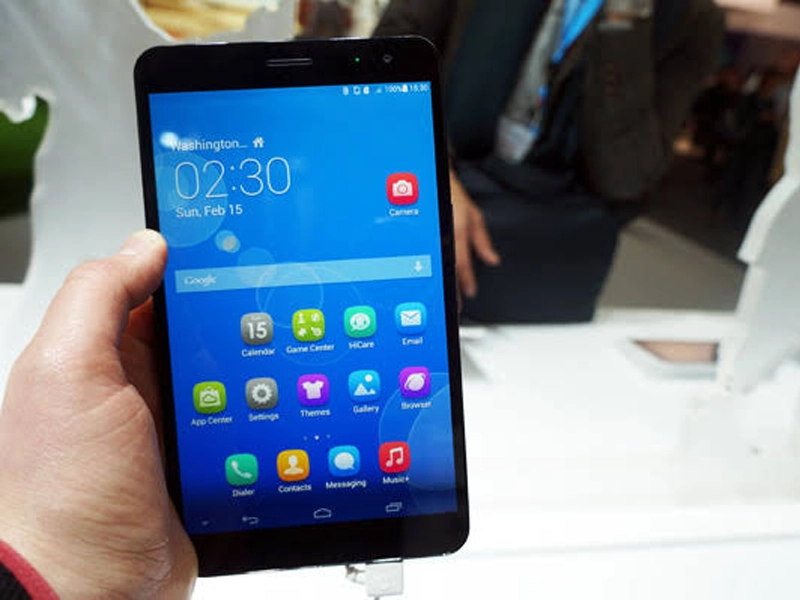
MWC 2014 and the Peak Phablet Era
At MWC 2014, brands were experimenting hard.
- Bigger screens
- Slimmer bodies
- Phone-tablet hybrids (aka phablets)
The huawei mediapad x1 fit right into this trend—but it didn’t just follow it. It pushed it further.
At a time when most phones were bulky, this device felt surprisingly premium and forward-thinking.
How Huawei Defied Tablet Design With 2.99mm Bezels
This was the real highlight.
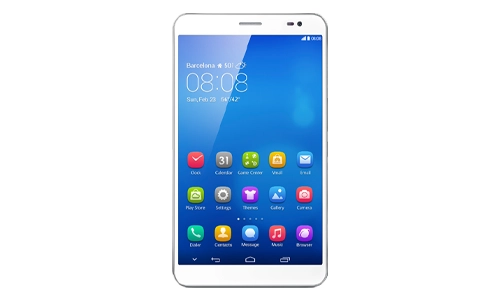
The huawei mediapad x1 featured:
Even today, thin bezels are a selling point. Back then? It was rare.
In many ways, this design approach predicted:
- Edge-to-edge displays
- Foldable phone aesthetics
- Larger screen usability in smaller bodies
It didn’t look like a typical tablet—it looked like the future.
The Software Limitations: Emotion UI 2.0
Not everything aged well.
The device ran Emotion UI 2.0, which had its quirks:
- No app drawer (everything on the home screen)
- Limited customization compared to stock Android
- Slower updates over time
For many users, this was the biggest downside.
The hardware felt ahead of its time.
The software? Not quite.
A Device That Paved the Way
Looking back, the huawei mediapad x1 did something important:
It showed that:
- Bigger screens could still be portable
- Bezels could shrink dramatically
- Hybrid devices had real potential
You can even argue it helped shape:
- Modern large-screen smartphones
- Foldable devices
- Slim tablet design trends
Repurpose Your Old MediaPad X1
Now let’s get practical—because this is where most readers actually benefit.
The Reality Check
Let’s be honest.
Today, the huawei mediapad x1:
- Is not safe for active internet use
- Won’t support modern apps properly
- Struggles with performance-heavy tasks
But that doesn’t mean it’s useless.
Step 1: Take It Offline (Important)
First step—disconnect it from the internet.
- Avoid logging into personal accounts
- Turn off Wi-Fi and mobile data
- Skip app updates or installs
This eliminates most security risks.
Step 2: Load Offline Content via MicroSD
This is where the device still shines.
Use the MicroSD slot to:
- Store eBooks
- Add movies or TV shows
- Keep music playlists
- Save PDFs or documents
You now have a distraction-free media device.
Perfect for:
Step 3: Turn It Into a Smart Home Display or Clock
Repurpose it into something functional:
- Bedside clock
- Digital photo frame
- Smart home dashboard (offline/basic)
- Kitchen recipe screen
Even with limited apps, it still works well for static or simple display use.
Why You Shouldn’t Throw It Away
Most people think old tech = useless.
Not true.
The huawei mediapad x1 still offers:
- A large, comfortable screen
- Solid build quality
- Reliable offline performance
If you use it right, it becomes a dedicated-purpose device—and that’s often better than a cluttered modern phone.
FAQs
1. Is the Huawei MediaPad X1 still usable today?
Yes, but only for offline or basic tasks. Avoid using it for browsing or sensitive apps.
2. Can I install new apps on the MediaPad X1?
You can try, but most modern apps won’t run smoothly or securely.
3. Is it safe to connect it to Wi-Fi?
Not recommended. The device no longer receives security updates.
4. What is the best use for it today?
Offline media player, eBook reader, or a smart display/clock.
5. Was the Huawei MediaPad X1 ahead of its time?
Yes—especially in design, with ultra-thin bezels and a large display in a compact body.
The Huawei Mediapad X1 may not keep up with today’s devices—but it definitely helped shape them.
And if you still have one?
You’re not holding outdated tech.
You’re holding a piece of transition-era innovation—that can still be useful in the right setup.


Catching Zzz’s on the Go: Why Sleep Tourism is the Hottest Travel Trend
How Much to Invest in Ethereum Today as a Beginner
Bedtime Mode: What It Is & How to Turn It On Easily
DNS to Block Ads: How to Stop Ads on Any Device Fast