When it comes to cybersecurity, knowing your enemy is half the battle. And if you own a device connected to the internet (which you obviously do), you’re a potential target for malware—a blanket term for malicious software designed to damage, steal, or exploit your data. Let’s decode the most dangerous types of malware attacks you need to watch out. 1. Virus Just like a biological virus, this malware attaches itself to files or programs and spreads when you open or execute them. Why it’s dangerous: It can corrupt or delete files, slow down your system, and even render your device unusable. 2. Trojan Horse Disguises itself as legitimate software. Once installed, it opens a backdoor for hackers to access your system. Real-life use: Often used to steal passwords, spy on users, or install more malware. 3. Worms Unlike viruses, worms...
When it comes to cybersecurity, knowing your enemy is half the battle. And if you own a device connected to the internet (which you obviously do), you’re a potential target for malware—a blanket term for malicious software designed to damage, steal, or exploit your data.
Let’s decode the most dangerous types of malware attacks you need to watch out.
1. Virus

Just like a biological virus, this malware attaches itself to files or programs and spreads when you open or execute them.
Why it’s dangerous: It can corrupt or delete files, slow down your system, and even render your device unusable.
2. Trojan Horse
Disguises itself as legitimate software. Once installed, it opens a backdoor for hackers to access your system.
Real-life use: Often used to steal passwords, spy on users, or install more malware.
3. Worms
Unlike viruses, worms can replicate and spread across networks without human action.
Impact: They can bring down entire systems, cause bandwidth issues, and pave the way for more serious attacks.
4. Ransomware
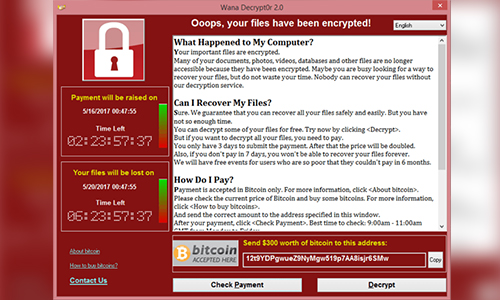
Locks your data and demands a ransom (usually in crypto) for access.
Examples: WannaCry, LockBit
Why it matters: Ransomware attacks cost organizations billions each year and can be devastating for individuals and businesses alike.
5. Spyware

Secretly monitors your activities—what you type, the sites you visit, and even your webcam or mic.
Common targets: Banking info, login credentials, and sensitive data.
6. Adware
Bombards you with unwanted ads, pop-ups, or redirects.
Is it harmful? Not always—but some adware is bundled with spyware, making it a real threat to your privacy.
7. Rootkits
Gives attackers remote control over your system by embedding itself deep within your operating system.
Why it’s scary: Rootkits are hard to detect and even harder to remove.
8. Keyloggers
Tracks every keystroke you make, capturing passwords, messages, and personal info.
Commonly used in: Targeted attacks on individuals, especially for identity theft and financial fraud.
9. Fileless Malware

Operates in your computer’s memory without leaving any trace on the hard drive.
Hard to catch: It uses trusted tools like PowerShell to perform malicious actions, making it nearly invisible to traditional antivirus software.
How to Protect Yourself
Now that you know the major types of malware attacks, here’s how to stay ahead of them:
- Keep your OS and software updated
- Use a reliable antivirus with real-time protection
- Never click unknown links or download unverified files
- Regularly back up your important data
- Enable multi-factor authentication wherever possible
Whether you’re a casual user or a cybersecurity pro, understanding the types of malware attacks is essential for digital survival. These threats evolve constantly, and staying informed is your first line of defense.




Solana’s Worth in Future: What Could 1 SOL Be Worth?
How to Wake Up the System From Sleep Mode on Any Computer
The Mokacam 4K Sports and Action Camera: Tiny but Powerful
How to Choose the Best Document Scanner for Your Needs