Millions of people now use AI chatbots for work, research, or personal conversations. If you’re one of them, you might be wondering: “Is my ChatGPT history public?” Here’s a clear look at how ChatGPT handles your chats, and how you can control your own data. No, Your ChatGPT History Isn’t Public When you chat with ChatGPT through your OpenAI account, your conversation history isn’t posted publicly or indexed by search engines. No one can look up your chats unless they have access to your account. However, OpenAI May Review Chats Internally OpenAI states in its privacy policy that human moderators or engineers can review conversations to improve safety and model performance. This doesn’t make them public, but it does mean some staff may see snippets in a secure environment. Shared Links and Screenshots Make It Public If you use the...
Millions of people now use AI chatbots for work, research, or personal conversations. If you’re one of them, you might be wondering: “Is my ChatGPT history public?” Here’s a clear look at how ChatGPT handles your chats, and how you can control your own data.
No, Your ChatGPT History Isn’t Public
When you chat with ChatGPT through your OpenAI account, your conversation history isn’t posted publicly or indexed by search engines. No one can look up your chats unless they have access to your account.
However, OpenAI May Review Chats Internally
OpenAI states in its privacy policy that human moderators or engineers can review conversations to improve safety and model performance. This doesn’t make them public, but it does mean some staff may see snippets in a secure environment.
Shared Links and Screenshots Make It Public
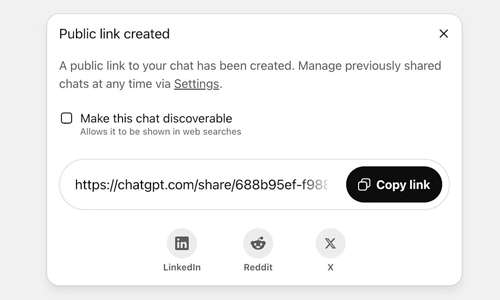
If you use the “share” feature or copy-paste your conversation into a forum, email, or social media post, it becomes public because you’ve shared it. The same goes for screenshots.
How to Manage or Delete Your Chat History
You can control what’s saved:
- Disable chat history in Settings > Data Controls to stop new chats from being stored.
- Delete individual chats or clear all history in the same section.
- Download your data if you want a copy before deleting.
Using ChatGPT in Workplaces or Third-Party Apps
If your employer or a third-party app gives you access to ChatGPT, that organization may retain logs of your conversations. In that case, your history could be visible to administrators or IT staff.
Best Practices for Sensitive Info
- Avoid entering private or confidential data you wouldn’t want reviewed.
- Use anonymized examples when testing prompts.
- Double-check third-party privacy policies if you’re not using OpenAI’s official site or app.
FAQs
Is my ChatGPT history visible to other users?
No. Only you (and anyone logged into your account) can see your history.
Does OpenAI sell my chat data?
No. According to its privacy policy, OpenAI does not sell user data. It may use anonymized data to improve its models.
Can I delete all my ChatGPT conversations?
Yes. Go to Settings > Data Controls > Clear All Chats to remove your entire history from your account.
If I use ChatGPT at work, can my boss see my chats?
If you’re using an enterprise plan or an employer-managed account, administrators may have access to your logs.
Your ChatGPT history isn’t public by default—but it isn’t completely private either. OpenAI may review chats internally, and anything you share externally becomes public. Use the built-in privacy tools to control your data and think twice before entering sensitive information.




Why Are Vertu Phones So Expensive?
Can a Smart Home Work Without Internet? Explained
Solana’s Worth in Future: What Could 1 SOL Be Worth?
How to Wake Up the System From Sleep Mode on Any Computer