Public Wi-Fi is everywhere—coffee shops, airports, hotels, libraries, and even public parks. It offers free internet access, making it tempting for remote workers, travelers, and everyday users. However, what many don’t realize is that public Wi-Fi is a goldmine for hackers. According to Norton, 40% of public Wi-Fi users have had their personal data compromised. Cybercriminals exploit weak security in public networks to steal passwords, hack devices, and intercept private communications. This guide explores the biggest risks of public Wi-Fi and provides expert tips to stay safe while staying connected. The Most Common Public Wi-Fi Security Risks A Man-in-the-Middle (MITM) Attacks A Man-in-the-Middle attack happens when a hacker intercepts communication between your device and the internet. Hackers use this method to steal login credentials, banking details, and sensitive emails. They can also inject malware into your downloads. In 2023, cybercriminals...
Public Wi-Fi is everywhere—coffee shops, airports, hotels, libraries, and even public parks. It offers free internet access, making it tempting for remote workers, travelers, and everyday users. However, what many don’t realize is that public Wi-Fi is a goldmine for hackers.
According to Norton, 40% of public Wi-Fi users have had their personal data compromised. Cybercriminals exploit weak security in public networks to steal passwords, hack devices, and intercept private communications.
This guide explores the biggest risks of public Wi-Fi and provides expert tips to stay safe while staying connected.
The Most Common Public Wi-Fi Security Risks
A Man-in-the-Middle (MITM) Attacks
A Man-in-the-Middle attack happens when a hacker intercepts communication between your device and the internet. Hackers use this method to steal login credentials, banking details, and sensitive emails. They can also inject malware into your downloads.
In 2023, cybercriminals targeted travelers in major U.S. airports using MITM attacks to steal credit card details from online transactions.
Fake Wi-Fi Hotspots (Evil Twin Attacks)
A hacker sets up a malicious hotspot that looks identical to a legitimate one (e.g., "Starbucks Free Wi-Fi"). When users connect, the hacker can monitor all activity and steal personal data.
Since users assume the network is safe, they often log in to banking apps, social media, and work accounts without hesitation.
A hacker could create a hotspot named "Airport_WiFi_Free" next to an actual airport Wi-Fi network, tricking unsuspecting users into connecting.
Packet Sniffing (Eavesdropping)
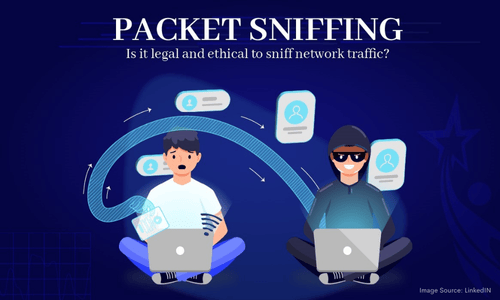
Using special software, hackers can capture and analyze unencrypted data passing through a public network. Any unencrypted login credentials or personal information entered on a non-HTTPS website is exposed. Hackers sell stolen credentials on the dark web or use them for phishing attacks.
Cybercriminals use tools like Wireshark and Firesheep to steal login credentials from unsecured networks.
Malware Distribution
In 2022, hackers used a public Wi-Fi network at a hotel in Las Vegas to install keylogging malware on users' laptops.
Hackers can inject malware into devices through public Wi-Fi. Some public networks use outdated security protocols, making it easy for attackers to exploit weaknesses. Malware can steal passwords, record keystrokes, and lock files in a ransomware attack.
Session Hijacking
In 2021, hackers stole the session cookies of social media influencers over public Wi-Fi, locking them out of their accounts. Once you log into a website, it sends a session token to your device for authentication. Hackers can steal this token and impersonate you. They gain access to your email, social media, and even online banking. This attack is common on websites that do not use HTTPS encryption.
How to Stay Safe on Public Wi-Fi
While public Wi-Fi is risky, you can take precautions to protect yourself.
Use a VPN (Virtual Private Network)
A VPN encrypts your internet connection, making it unreadable to hackers. VPNs prevent Man-in-the-Middle attacks and hide your online activity. Choose a trusted service like NordVPN, ExpressVPN, or ProtonVPN. It creates a secure "tunnel" for your data, preventing hackers from spying on your online activity.
Avoid Accessing Sensitive Accounts
When using public Wi-Fi:
❌ Do not log into banking apps or work accounts.
❌ Avoid entering passwords on websites that are not HTTPS-secured.
✅ Use mobile data for financial transactions instead.
Always check for HTTPS before entering login credentials. If a website only uses HTTP, it is not secure.
Enable Two-Factor Authentication (2FA)
Even if hackers steal your password, they won’t be able to access your account without a second verification step. Enable 2FA on important accounts like email, banking, and social media. Use authenticator apps like Google Authenticator or Authy instead of SMS-based 2FA.
Forget the Network After Use
Many devices automatically reconnect to previously used Wi-Fi networks, making them vulnerable. Manually "Forget" the network after using public Wi-Fi. Disable Auto-Connect to public Wi-Fi in your settings. AI
Hackers exploit auto-connect features by setting up fake Wi-Fi networks that imitate trusted ones.
Use Your Mobile Hotspot Instead
Your phone’s data connection (4G/5G) is more secure than public Wi-Fi. If possible, use your phone’s mobile hotspot instead of connecting to public networks. Enable hotspot encryption (WPA3) to prevent unauthorized access.
Turn Off Bluetooth & File Sharing

Hackers can exploit open Bluetooth connections or AirDrop to send malware. Disable Bluetooth and file-sharing services when not in use. Set your device to "Hidden" mode to prevent unauthorized connections. In 2020, "BlueBorne" malware exploited Bluetooth vulnerabilities to infect millions of smartphones.
Install Security Software

Security software can alert you if a public Wi-Fi network is compromised. Using antivirus and anti-malware software can detect and block threats. Use Bitdefender, Norton, or McAfee to scan for malware. Enable firewall settings to prevent unauthorized access.
While public Wi-Fi is convenient, it comes with serious cybersecurity risks. Hackers use MITM attacks, fake hotspots, malware injections, and session hijacking to steal data. To stay safe, use a VPN, avoid sensitive transactions, enable 2FA, and turn off auto-connect. If possible, use your mobile hotspot instead of public Wi-Fi.
If you must use public Wi-Fi, assume that everything you do could be monitored—and take the necessary precautions. By following these steps, you can browse safely and avoid falling victim to cyber threats.





Solana’s Worth in Future: What Could 1 SOL Be Worth?
How to Wake Up the System From Sleep Mode on Any Computer
The Mokacam 4K Sports and Action Camera: Tiny but Powerful
How to Choose the Best Document Scanner for Your Needs