Your smartphone is a strange creature. In one moment, it steals hours through endless scrolling. In another, it can organize your entire life with surgical precision. The difference comes down to one thing: using the top apps for productivity. With the right Android apps, your phone transforms into a digital command center, quietly managing tasks, reminders, and focus while you get things done. No chaos. No mental overload. Just clarity. Why Productivity Apps Are No Longer Optional Modern life is layered with micro-tasks, emails, deadlines, grocery lists, meeting notes, ideas that vanish if not captured instantly. Keeping all of that in your head is like trying to hold water in your hands. That’s where productivity apps step in. They help you: Externalize your thoughts Structure your day Reduce decision fatigue Build consistent habits Instead of reacting to everything, you start...
Your smartphone is a strange creature. In one moment, it steals hours through endless scrolling. In another, it can organize your entire life with surgical precision. The difference comes down to one thing: using the top apps for productivity.
With the right Android apps, your phone transforms into a digital command center, quietly managing tasks, reminders, and focus while you get things done. No chaos. No mental overload. Just clarity.
Why Productivity Apps Are No Longer Optional
Modern life is layered with micro-tasks, emails, deadlines, grocery lists, meeting notes, ideas that vanish if not captured instantly. Keeping all of that in your head is like trying to hold water in your hands.
That’s where productivity apps step in.
They help you:
- Externalize your thoughts
- Structure your day
- Reduce decision fatigue
- Build consistent habits
Instead of reacting to everything, you start operating with intention.
Top Apps for Productivity on Android
Here are some of the top apps for productivity that genuinely improve daily life without adding friction.
Notion – The Everything Workspace
Notion is less of an app and more of a blank canvas. You can build task lists, journals, content calendars, or even full project dashboards.
What makes it powerful is flexibility. It adapts to your system instead of forcing you into one.
Why it works:
It replaces multiple apps with one unified workspace.
Todoist – The Task Master
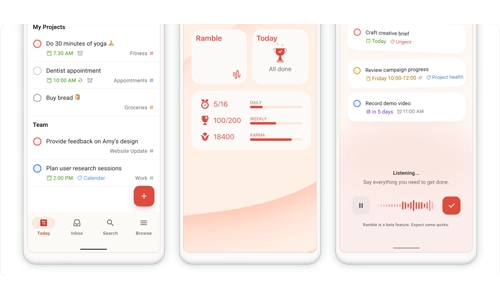
Todoist is built for people who want clarity without complexity. You can create tasks, assign deadlines, and organize them into clean categories.
Its natural language input is a hidden superpower. Type “Submit report tomorrow at 10am” and it schedules itself.
Why it works:
Simple on the surface, powerful underneath.
Google Keep – Capture Thoughts Instantly
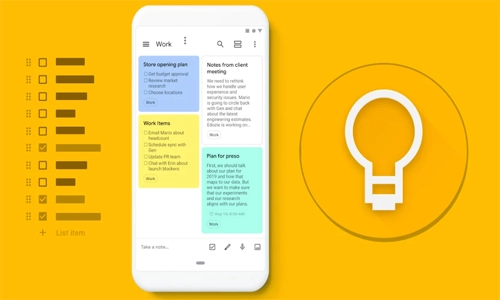
Ideas don’t wait. Google Keep ensures you don’t lose them.
From quick notes to voice memos and reminders, it’s designed for speed. Open, type, save, done.
Why it works:
Zero friction. It’s always ready when your brain isn’t.
Trello – Visualize Your Workflow
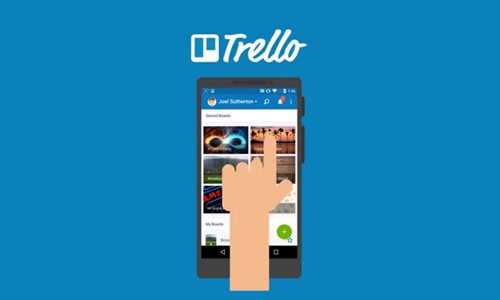
Trello turns tasks into cards and boards, giving you a visual snapshot of your work.
Dragging a task from “To Do” to “Done” feels oddly satisfying, like ticking off progress in real time.
Why it works:
It makes productivity visible, not abstract.
Forest – Grow Focus, Literally
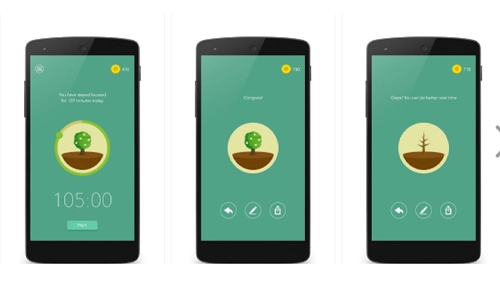
Forest gamifies concentration. You plant a virtual tree that grows while you stay focused. Leave the app, and the tree dies.
It sounds simple, but it taps into something powerful: accountability.
Why it works:
It makes focus feel rewarding instead of restrictive.
How These Apps Actually Make Life Better
Using the top apps for productivity isn’t about cramming more tasks into your day. It’s about reducing friction.
Here’s what changes:
- You stop forgetting important tasks
- You spend less time planning and more time doing
- You avoid constant app-switching chaos
- You gain mental clarity
It’s like moving from scattered sticky notes to a clean, organized dashboard.
Choosing the Right Productivity Setup
Here’s the mistake most people make: downloading five apps at once and using none consistently.
Instead, build a simple stack:
- One app for tasks (Todoist)
- One for notes or ideas (Keep or Notion)
- One for focus (Forest)
That’s enough.
Let your system grow naturally instead of overwhelming yourself from day one.
The Real Secret: Consistency Over Features
The most powerful productivity system is not the most advanced one. It’s the one you actually use every day.
Even the top apps for productivity won’t help if they sit unused on your home screen.
Start small. Use them daily. Let them quietly reshape how you manage time and attention.
FAQs
What are the top apps for productivity on Android?
The top apps for productivity on Android include Notion, Todoist, Google Keep, Trello, and Forest. These apps help manage tasks, organize ideas, and improve focus.
Which productivity app is best for daily tasks?
Todoist is one of the best apps for daily task management due to its simple interface, reminders, and smart scheduling features.
Are productivity apps really effective?
Yes, productivity apps are effective when used consistently. They reduce mental load, improve organization, and help you stay focused on important tasks.
How do I choose the right productivity app?
Choose based on your needs. Use task managers for planning, note apps for ideas, and focus apps to reduce distractions. Start with one or two apps instead of many.
Can productivity apps improve focus?
Yes, apps like Forest are specifically designed to improve focus by reducing distractions and encouraging deep work sessions.
Your phone doesn’t need to be a source of distraction. It can be your most efficient tool, quietly organizing your day while you focus on what matters. The top apps for productivity are not about doing more. They’re about doing better. And once you find your rhythm, your phone stops being noise. It becomes momentum.


How Much Water Can Water-Resistant Phones Handle?
Bitcoin Halving: A Deep Dive into the Scheduled Supply Shock of Bitcoin
Why Are Vertu Phones So Expensive?
Can a Smart Home Work Without Internet? Explained